 Overclocking is the process of running a computer component at a higherclock rate (more clock cycles per second) than it was designed for or was specified by the manufacturer, usually practiced by enthusiasts seeking an increase in the performance of their computers. Some purchase low-end computer components which they then overclock to higher clock rates, or overclock high-end components to attain levels of performance beyond the specified values. Others overclock outdated components to keep pace with new system requirements, rather than purchasing new hardware.
People who overclock their components mainly focus their efforts on processors, video cards, motherboard chipsets, and random-access memory (RAM). It is done through manipulating the CPU multiplier and the motherboard's front side bus (FSB) clock rate until a maximum stable operating frequency is reached, although with the introduction of Intel's new X58 chipset and the Core i7 processor, the front side bus has been replaced with the QPI (Quick Path Interconnect); often this is called the Baseclock (BCLK). While the idea is simple, variation in the electrical and physical characteristics of computing systems complicates the process. CPU multipliers, bus dividers, voltages, thermal loads, cooling techniques and several other factors such as individual semiconductor clock and thermal tolerances can affect it.
source
Posted by
Miftachul21
at
1:01 PM
 This guide is based on a user which use this guide and worked:
When he tried to turn volume up, the volume will be going to down slowly? If you have same problem, you may have to follow below step instruction to solve the problem:
a. You have to uninstall Alienware Command Center
b. Uninstall OSD Utility
c. You have to reinstall Alienware Command Center and OSD Utility to your alienware notebook. You can get file from here and here
d. If this problem still appear, you may have to schedule check your C drive (Automatically fix error and recover bad sector on your hdd)
e. If the problem still occurs, you may have to shut down your computer, unplug your notebook, take out the battery for 10 or 15 seconds, after 15 seconds, plug your battery and plug AC power and turn on your notebook.
Posted by
Miftachul21
at
9:05 AM
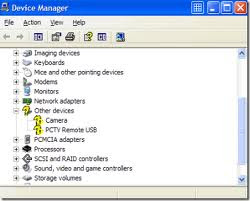 Most people use Windows are familiar with the device driver, which is a small software program that allows Windows to communicate with different hardware. Windows XP, Vista and Windows 7 is really quite a lot of hardware support by default, but some hardware will require additional device drivers. Driver is the intermediary for communications between two or more hardware.
Problems Missing Device Drivers
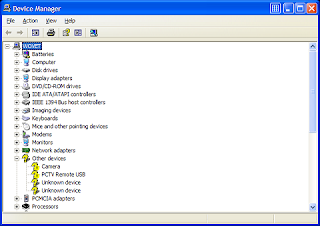
As computer usage, there are times when the driver of a hardware missing from the windows. What happens if an additional device driver is missing? In many cases and that is for sure, will result in errors into the hardware that is not known or unknown usb device. Windows will display an unknown device as "unknown" in the list of devices that are not known. There are times displayed in the category of "other devices" in Device Manager. An unknown error usb device is one of the most common type occurs.
Below are examples of "unknown devices" in Windows XP.
Since Vista and Windows 7 out, supports more devices than Windows XP. Here's an example Device Manager on Vista with unknown devices.
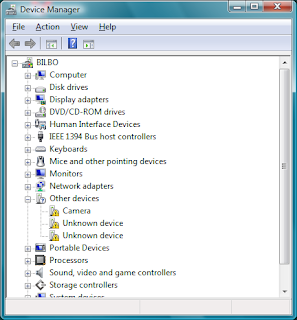
Complications error unknown device is the fact that it takes a different device drivers for Windows 32-bit and 64-bit versions. Drivers for Windows 64-bit version is very hard to find in the past, but became easier with the increasing use of Vista and the latest release of Windows 7, which are both dominant in 64-bit version.
Unknown device error can occur for all types of hardware. As mentioned, the unknown device is the most common USB device not recognized, and the less common case is an unknown PCI device. Function USB and PCI bus allows hardware to communicate with the computer. Examples of an unknown USB device such as USB webcams, mobile phones and external USB hard drives. Unknown PCI device is more likely the video card, audio card and network card.
Solving a Problem Unknown Device
The most common causes for the error unknown device driver is missing. How to deal with is to find the correct driver and reinstalling the drivers the hardware.
1. If you right-click the unknown device in Device Manager you can select the option update driver. This option will look for device drivers for your hardware.
2. For an unknown USB device, unplug the device first and then put it back after waiting a few seconds. Sometimes this can directly solve the problem without re-install its driver.
3. There are many error codes that may be visible, but not all produce an unknown device. If there is an unknown device error, try always try to uninstall the device and restart the computer as this will require drivers to be reinstalled.
4. If Windows does not have drivers for unknown device, you will need to search and download drivers for devices that are not known it. If you know the brand and model of your device, you can try to find the driver on the manufacturer's website.
5. If you can not find drivers for unknown device you can try and use the driver program finder (http://www.driverfinderpro.com/home/). This type of program will automatically detect and identify all your hardware devices, including an unknown device, and provides the latest drivers available for it.Sometimes also errors generated by the code. You can find the error code by right-clicking the unknown device in Device Manager, and select Properties in the popup menu. This will show the status of the device, including an error code. unknown device often has an error code 1, because this is the state that the device is not configured properly.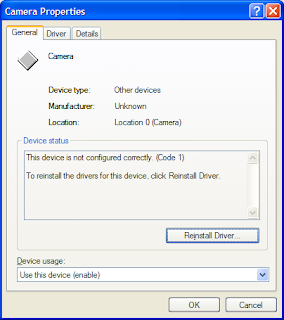
Examples of other error codes on the unknown device;
* Code 10, this device can not start.
* Code 28, the drivers for this device are not installed.
* Code 31, the device is not working properly Because Because Windows can not load the drivers required for this device.
* Code 37, Windows can not initialize the device driver for this hardware.
* Code 39, Windows can not load the device driver for this hardware. The driver May be corrupted or missing.
Some messages on common but some codes of them lead to the same problem.
Posted by
Miftachul21
at
7:22 AM


 Overclocking is the process of running a computer component at a higherclock rate (more clock cycles per second) than it was designed for or was specified by the manufacturer, usually practiced by enthusiasts seeking an increase in the performance of their computers. Some purchase low-end computer components which they then overclock to higher clock rates, or overclock high-end components to attain levels of performance beyond the specified values. Others overclock outdated components to keep pace with new system requirements, rather than purchasing new hardware.


