 Sometimes we are maniacs download, be it a file zip / rar software and other files, menumakan file we downloaded was corrupted or damaged. It must be annoyed as hell. Big file, long download just really resentful. But we do not have to download again, because there is a chance the file can still be improved. Here I try to explain how to repair the corrupted files.
There are several possibilities we get reports that we file corrupted:
1. The file was corrupted from the uploader
2. File corrupted during the download process may occur in several parts divided file
3. Special files are divided into several parts do not fit we extract the sequence
Solutions to problems above:
1.For this case it goes wrong from the uploader (human name would be wrong as well) so just be patient and hope hope - hope the uploader will upload a new file again.
2. The second case is what we will consider seriously.
First download a program called QuickSFV can download it here. Once the program is run now checks one by one (to which her part - part), so we can confirm which files are corrupted
The next step we open the file that a suspect had been with the program then winrar
1. Open the file. Rar [Winrar] the error
2. Tools> Repair Archive">In winrar menu> Tools> Repair Archive
3. Rename the file on the repair had been
4. Extract again.
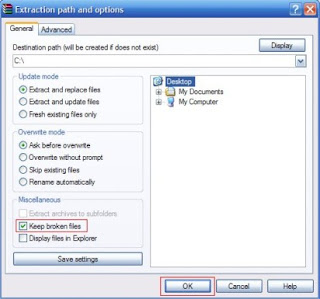
Or keep you force also extract the files had been corrupted by
1. Right click on the zip file and select Extract files ... on the context menu.
2. check settings on the keep broken files
3. Click OK.
 3. In the third case the solution is that we see the sequence of each part that we download on our IDM (depending on what use accelerator using that) if the download time is also in accordance with the list provided by the uploader. That way we can extract the appropriate sequence.
So and hopefully usefulsources :
Adipedia
Posted by
Miftachul21
at
9:25 AM

Check the Power Supply, try using another power supply if still restarts itself or hangs. If after replacement power supply turns normal / good, power supply means there is a problem. Change can bebe improved if only because I myself was not sure whether still can function properly ,because the power supply is a vital component . Especially for the current price very cheap power supply, I suggest you replace it. Check to see if there is virus, anti-virus program should always be installed and enable the auto protect her. I used to use Anti-virus eset smart security. You should frequently update your antivirus because if there is a new variant virus, your anti-virus will detect at once eliminate the virus.
At the moment there hangs and blue screen messages like "vxd error at address ...", there is usually a problem in memory. Clean the memory is like a step above. Try to reinstall Windows. If it still hangs / restarts itself let you check on the motherboard, you notice the physical changes in particular components Elko / capacitor, a black round shape no writing its capacity between 1000 uf/10Volt s / d 3300 uf/10 volts, usually seen, if the damage visible bloating / swelling and remove fluid or rust.
sources :
Adipedia
Posted by
Miftachul21
at
9:14 AM
 Check the power supply. In the state of the power cord from the power supply off, disconnect the cable socket mounted on Mainboard Atx1. Once separated, attach the power cord back in, connect / shortkan green wire with black cable, check whether the power supply fan spinning? If the rotating means good power supply. Remove the cable connections and reattach the cables were Atx1 to the motherboard. Check the Clear CMOS Jumper, whether in Clear or Free position, usually when a new motherboard, the position of the CMOS jumper on the Clear position. Check the IC chipset in a state connected and in the Switch On, whether or not excessive heat, over-heat means the chipset is already damaged. For CMOS IC part so far not been sold freely.
Check also whether the switch on its functioning. Unloading the Motherboard carefully, you try to wear clean thinners, if you can use thinner bottles do that on the tin. After you dry clean. Replace the IC regulator which is located around the ATX power socket on the motherboard. Replace Elko that seated 1000 s / d 3300 uf / 10 Volt ATX power connector is located near the motherboard. Be careful to make sure the components apart pairs power cable not connected to the mains.
sources : Adipedia
Posted by
Miftachul21
at
8:32 AM


 Sometimes we are maniacs download, be it a file zip / rar software and other files, menumakan file we downloaded was corrupted or damaged. It must be annoyed as hell. Big file, long download just really resentful. But we do not have to download again, because there is a chance the file can still be improved. Here I try to explain how to repair the corrupted files.
 3. In the third case the solution is that we see the sequence of each part that we download on our IDM (depending on what use accelerator using that) if the download time is also in accordance with the list provided by the uploader. That way we can extract the appropriate sequence.


