Friday, January 28, 2011

tricks Quick Access Toolbar on Office 2007

Start the 2007 version of Microsoft Office introduces interface called the Ribbon. Here the user is not guided solely by a row of menus, but through several tabs containing rows of icons are grouped by "similarity"function.
For users who want quick access to commands that are often given, the Office provides the Quick Access Toolbar is located on the right of the Office Button. Here the standard consists of the command Save, Undo and Redo.

With minor modifications, existing commands can be added or subtracted according to user habits.
For example, there is a kind of "habit"in MS Excel that whenever going to do printing, it first needs to be previewed via the Print Preview command. In the Ribbon interface, these commands are accessible via the Office Button> Print> Print Preview.
To be more practical, the Print Preview command can be added in the following manner:

1.
Right click on Office Button. Select Customize Quick Access Toolbar.

2.
In row Popular Commands (under the Choose commands from), select Print Preview, then click Add to add it to the Quick Access Toolbar (or click Remove to delete it). Click OK.

Print Preview command will then appear in the rows of the Quick Access Toolbar.

If there are errors of placement or selection of the command, the command can be immediately deleted by right clicking on it and choose Remove from Quick Access Toolbar.

Location of the Quick Access Toolbar can also be moved to the bottom of the Ribbon, with a right click on the Office Button and select Show Quick Access Toolbar Below the Ribbon.
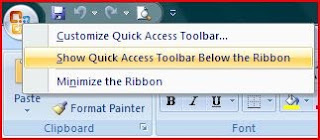
The interface will change as follows:

To restore it to its original location, the steps are the same as above but by choosing Show Quick Access Toolbar Above the Ribbon.
Read More

how to fast shutdown your PC

You never listen to music through the computer until you fall asleep? Or you ever watch TV Tuner TV to fall asleep and the computer stays on when you sleep? This will not only make your PC work continuously will also make your electric bill swell!

Do not worry, I will learned some tricks to prevent it, without installing any software you can do it in a breeze, let's get started:

1. Click the Start menu> Run or press window + r windows

2. Type: tsshutdn XX / powerdown
NB: XX = time that you want in seconds itungan

Suppose you want to set the timer for 1 hour, then you just type in tsshutdn 3600 / powerdown

3. If so, click OK, a confirmation window will appear with the message:
"System is shuting down in 3600 seconds"

4. Click OK on the pop up window

5. Minize DOS window which appears (not a DOS window on CLOSE. If at CLOSE, the timer will not run)

Good luck
Read More

Good trick Create a Password

Password is one way to secure a computer system. This computer system can include applications, databases or operating system. Therefore, assign a password should not be arbitrary and must consider certain things. Password must be made by considering the following points: *. At least the password character length is 7 (seven) characters. You can also create a longer password again for security. *. Using at least 1 (one) character symbols on the sequence of characters your password
*. If you apply the system password history, then make sure your new password is always different from previous passwords
*. Your password should not contain the name or username
*. Do not use words that are commonly used in karaktar password. This includes the words used in the dictionary

Some examples of strong passwords for example as follows.

*. a4 $ Jhi &]
*. i%uA">3k> i% UA
*. O @ u # 5nQ

Password protection system is actually the weakest in the computer system. Therefore choose a strong password is a must. Why is that? Password cracking tools become more sophisticated in his attempt to disassemble the password, plus also a computer used in password cracking, the better the performance. Password that previously took a week to crack, so this time can be cracked in just a few hours.

Software to crack passwords using various common approaches: a smart guess (intelligent guessing), dictionary attacks (dictionary attack) as well as automation that tries to try to use a combination of characters. If given enough time, then the automated method can crack any password. But if the password used is very strong, it will require a very long time to solve.

So quick tips on making good passwords and strong. May be useful for you all.
Read More

Saturday, January 22, 2011

Audio Driver Asus S3N

A new operating system on your Asus S3N laptop! Don’t worry we have all the required drivers here to get you going. By now You would have noticed that most of the devices are not working properly and require you to update their drivers. For your Audio device which will probably not work until you install the correct Asus S3N driver, here are all the Audio drivers related to Asus S3N driver for different operating system. So simply find your relevant driver and proceed onto the link and download your required file.


Windows XP
AUDIO
Asus S3 Series S3N AUDIO Driver for Windows XP
This driver is for AUDIO Driver has the Version 5.12.1.3665 and has a file size of 18.92 (MBytes)


Read More

Modem Drivers for Compaq Presario CQ40 415TX

Compaq Presario CQ40 415TX laptop Modem Driver can be really difficult to find especially after when you have installed a fresh operating system and now you need to be connected to your Modem. If your Modem device did not auto install after a fresh install don’t worry. Here at Laptopdrivers.net simply find the relative driver for your Modem for your installed operating system. Here is a list of nearly all the available drivers for Compaq Presario CQ40 415TX for operating systems such as Windows Xp, Windows Vista and Windows 7.

Microsoft Windows Vista (64-bit)
Driver – Modem
Compaq Presario CQ40 415TX LSI High-Definition Audio (HDA) Modem Installer And Driver for Microsoft Windows Vista for Microsoft Windows Vista (64-bit)
This driver is for LSI High-Definition Audio (HDA) Modem Installer and Driver for Microsoft Windows Vista has the Version 2.1.91.0 and has a file size of 4.42M

Microsoft Windows Vista
Driver – Modem
Compaq Presario CQ40 415TX LSI High-Definition Audio (HDA) Modem Installer And Driver for Microsoft Windows Vista for Microsoft Windows Vista
This driver is for LSI High-Definition Audio (HDA) Modem Installer and Driver for Microsoft Windows Vista has the Version 2.1.91.0 and has a file size of 4.42M
Read More

Tuesday, January 18, 2011

Toshiba NB250 PLL2XE XP driver

Read More